

DTF Sample Pack Guide: Testing Your Transfers
What if the transfer that looks best on screen isn’t the one that fits your production workflow? Product photos can’t show every detail of color, finish, or feel, so a hands-on comparison can make the choice clearer. That’s what a DTF sample pack is for: letting you assess real transfer options before deciding what to order.
It’s reasonable to want more than a polished product image before choosing a transfer for a customer job or product line. Transfers by MoreTranz’s free sample pack includes TrueColor®, TrueColor® MAX, TrueColor® GLITTER MAX, TrueColor® SUB, UV DTF Decals, and Spangles, giving you several options to examine firsthand.
In this guide, you’ll learn how to compare the samples against your artwork, project, and production needs, then make your test useful and repeatable. We’ll cover what to observe, how to keep comparisons consistent, and how your findings can guide your next order. Make the decision with samples in hand, not guesswork from a screen.
Key Takeaways
- Understand what is a DTF sample pack for by using it to assess transfer options against real project needs.
- Compare samples under consistent viewing conditions so differences in appearance are easier to evaluate.
- Record each sample’s appearance, the job you’re considering it for, and any questions that remain.
- Define the job, inspect relevant options, take notes, and follow the instructions for the specific product.
- Use your findings to narrow down the transfer category for upcoming work.
What Is a DTF Sample Pack For? See What Product Photos Cannot Show
A product image can show a design, but it can’t give you a sample to inspect in person. So, what is a DTF sample pack for? It’s a practical way to compare transfer options before selecting one for a job. You can look closely at printed color and detail, inspect the finish, and feel the sample instead of relying on a screen to represent those qualities.
A DTF sample pack is a hands-on comparison tool that helps decorators assess transfer options against a specific design and workflow before placing a production order. Use it to see whether a sample’s appearance fits your artwork and whether its physical feel suits the result you want.
A sample can inform your decision, but it can’t guarantee that a production run will look or perform exactly the same. Your observations apply to the sample and conditions you evaluated. Production results can depend on the transfer, artwork, material, and process. Keep what you directly observe separate from assumptions about long-term performance.
What can a DTF sample help you evaluate?
Start with visible traits. Look at color and detail, then note the finish and physical feel. Compare the sample with the artwork and project you have in mind. Ask whether the appearance works for the design and whether the sample’s feel is appropriate for the result you’re aiming to create.
- Appearance: Do the sample’s color and visible details suit the design?
- Finish: What do you notice when you view the surface under consistent lighting?
- Feel: How does the sample feel in your hand, and does that matter for the job?
- Workflow fit: Is this option relevant to the project you’re preparing?
These are observations, not durability test results. A sample’s appearance and feel alone can’t establish how it will hold up over time. Record what you actually notice rather than treating a brief inspection as proof of performance.
Who benefits most from testing DTF samples?
Apparel decorators, print shops, independent creators, and brands can all use samples to make a more informed transfer choice. Testing is especially useful when you handle different kinds of jobs. An option that suits one design or customer request may not be the right fit for another. Seeing several categories side by side gives you a practical starting point for matching options to projects.
Experienced decorators can benefit, too. A sample test can help you assess a new option against familiar work and preferences. MoreTranz’s sample pack brings multiple transfer categories together for hands-on evaluation. The MoreTranz sample pack lets you examine the options before choosing which category to consider for an upcoming job.
What Comes in the MoreTranz DTF Sample Pack?
The free MoreTranz sample pack includes several transfer categories, so you can examine a range of options rather than assess just one type. The pack includes:
- TrueColor®
- TrueColor® MAX
- TrueColor® GLITTER MAX
- TrueColor® SUB
- UV DTF Decals
- Spangles
This mix is useful for decorators who work on different kinds of projects. The goal isn’t to declare one category the winner. Instead, identify which options are relevant to the jobs you handle, then compare each option with its intended application. You can explore MoreTranz DTF transfer types as you consider how the categories fit your work.
How the included transfer categories differ
Within the DTF options, TrueColor® is the standard five-color product, while TrueColor® MAX is the premium nine-color product. The pack also includes TrueColor® GLITTER MAX, TrueColor® SUB, UV DTF Decals, and Spangles. These are different product categories. Don’t assume they’re interchangeable or suited to the same job.
Start with the project. Consider its artwork, the material or surface involved, and the appearance you want. Then inspect the relevant sample and record what you can directly observe. For example, if you’re considering TrueColor® and TrueColor® MAX for a design, compare both with that design rather than judging them in the abstract. For another project, a different category in the pack may be more relevant.
Why a multi-category sample selection is useful
A mixed selection gives decorators more than one option to consider for varied production needs. A creator preparing different kinds of orders can review the categories that seem relevant to each job instead of trying to fit every design to one transfer type. The pack is a starting point for a practical category-by-category review, not a universal ranking.
Keep each comparison tied to its intended application. Look at a sample in relation to the artwork and project it might serve, and note the qualities that matter for that use. A visual effect that appeals for one design may not be a priority for another. Separate those needs in your notes so your choice reflects the job, not just a first impression.
If you’re weighing several upcoming projects, sort them by the transfer category you want to evaluate, then inspect the matching samples with those jobs in mind. The MoreTranz DTF sample pack offers a hands-on way to review the range before choosing what to consider for production.
What Should You Compare When Testing DTF Transfer Samples?
A useful sample test turns first impressions into notes you can act on. Focus on what you can observe, how it relates to a specific job, and what you still need to learn. Understanding what is a DTF sample pack for means using the samples to inform a choice, not treating a quick inspection as proof of how a production run will turn out.
Compare samples under consistent conditions. Use the same lighting, viewing distance, angle, and background for each one. If those conditions change, color and finish may seem different for reasons unrelated to the samples. A consistent setup makes it easier to distinguish sample differences from changes in how you’re viewing them.
Compare color and visual finish against the design
Place the design or a reliable color reference beside each sample. Look at the colors that matter most to the artwork and brand palette, then check gradients, fine details, and bright areas. Note what you see, such as a color appearing closer to your reference under the test conditions. Don’t assume that a sample guarantees an exact match in production.
For color-focused decisions, keep the product systems clear: TrueColor® is the standard five-color DTF product, while TrueColor® MAX is the premium nine-color DTF product. MoreTranz’s nine-color system adds red, green, blue, and orange to CMYK for richer reds, true-to-life skin tones, smooth gradients, and bright colors. Record which sample appears to suit your artwork and why. Treat that as an observation, not a promise about how every design will reproduce.
Match each sample to its intended decorating job
Give every sample a job to answer to. Note which planned project it might suit, then assess it on that basis instead of ranking every category by the same criteria. TrueColor® GLITTER MAX, TrueColor® SUB, UV DTF Decals, and Spangles are distinct options. Consider the relevant product information and your specific project when deciding which sample to evaluate.
Category | Observed appearance | Intended job | Questions to record
TrueColor® | Note color and visible detail. | Which design are you assessing? | Does it suit your reference?
TrueColor® MAX | Note color and visible detail. | Which design are you assessing? | What differences do you observe beside TrueColor®?
TrueColor® GLITTER MAX | Describe the finish you see. | Which project are you considering? | Does the appearance fit that design?
TrueColor® SUB | Record visible traits without assuming results. | Which planned job is relevant? | What do you still need to learn?
UV DTF Decals | Note what you can directly observe. | Which project are you evaluating? | Is this the category you intended to assess?
Spangles | Describe the sample’s appearance. | Which design or job is in view? | What makes it a possible fit?
Keep three things distinct in your notes: direct observations, personal preferences, and assumptions about production performance. “I prefer this appearance” is a preference. “It will perform better over time” is an assumption unless you’ve tested for that outcome. This distinction makes your comparison more useful when deciding which category to evaluate further.
How to Test a DTF Sample Pack Before Choosing a Production Option
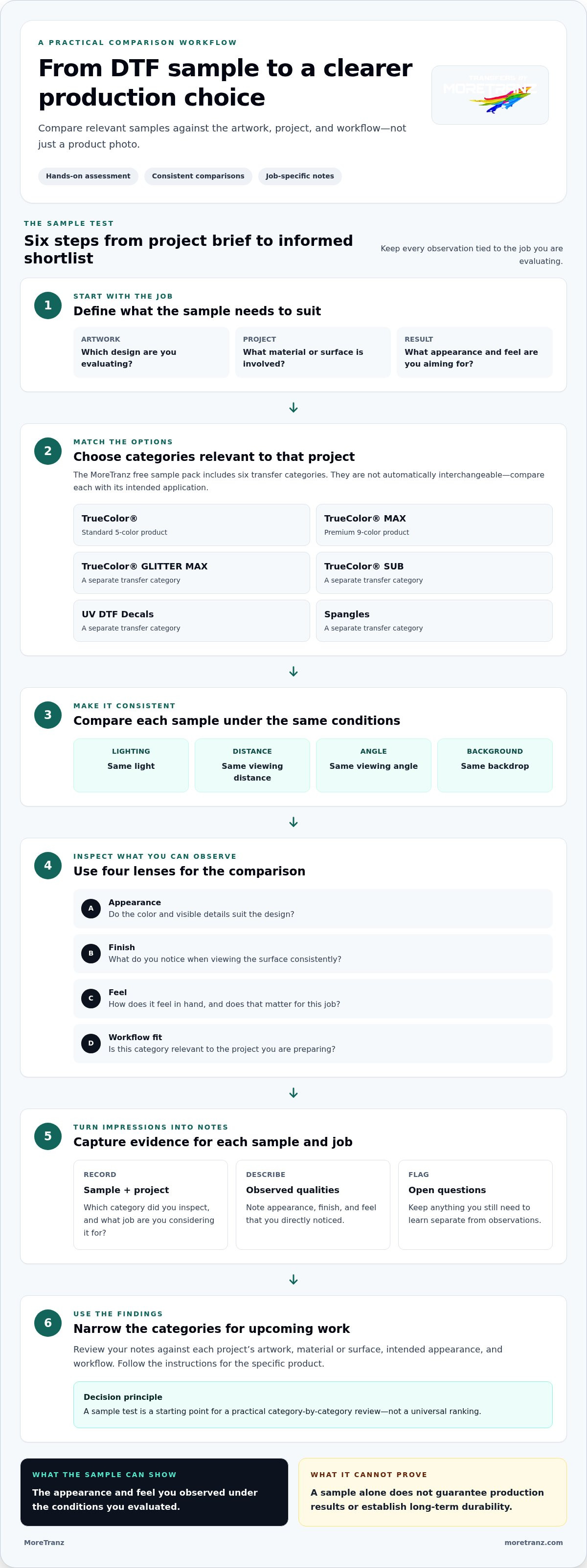
A useful sample test follows the same logic each time: define the job, inspect the relevant samples, record what you observe, then choose what deserves further evaluation. That’s the practical value behind what is a DTF sample pack for: turning a broad set of options into a decision tied to real work. Keep the process simple, and your notes will be easier to compare across projects.
- Define the job. Choose a planned design and identify the garment or item you’re decorating. Note the visual result you want and any production needs that matter for the order.
- Inspect relevant samples. Focus on categories that may suit the job. Review their appearance and feel in a consistent setting, using the criteria in your notes.
- Record observations. Write down what you directly see, the conditions of your evaluation, and any questions that remain. Keep observations distinct from preferences and predictions.
- Choose a next step. Compare your notes with the job’s requirements. Decide which category merits further evaluation or consideration for an upcoming production order.
Set up a useful, consistent sample evaluation
Choose a representative design, not an unrelated example. If the work is for a particular garment or item, use one that reflects the job. Record the sample category and evaluation conditions, such as the viewing environment and material involved. Consistency helps you make a fair comparison. Describe visible results plainly, since a sample inspection alone can’t predict durability.
Follow the instructions for the specific transfer you’re testing. Don’t copy another product’s temperature, time, pressure, or peel settings. Instructions for one product aren’t a substitute for instructions for another. Use the MoreTranz transfer instructions relevant to your product.
Use this compact scorecard for each option:
- Appearance: What colors, details, and finish do you observe?
- Intended use: Which planned job are you assessing it for?
- Production fit: What parts of your workflow seem relevant, and what still needs a test?
- Next step: Is this option worth evaluating further for that job?
Turn observations into a clear next step
Review your scorecards beside upcoming orders and customer requirements. An option that suits one project may not suit another, so don’t make a single category the automatic answer for every job. Mark which choices appear aligned with the work, which need more evaluation, and which don’t match the project’s priorities.
Keep the decision proportional to what you learned. Notes about appearance and workflow fit can help narrow your options, but they don’t prove long-term performance. If an important question remains, make it the focus of a further product-specific test before committing to a larger run.
What to Do After Testing the MoreTranz DTF Sample Pack
Your notes are most valuable when they lead to a job-specific decision. Review each sample’s appearance and your scorecard, then compare them with the requirements of upcoming orders. The goal isn’t to find one transfer category for every project. It’s to identify which option merits consideration for the work in front of you.
Choose a relevant transfer category for the next job
Start with the artwork and the result you want. If color is a key factor, compare what you observed in TrueColor® and TrueColor® MAX, keeping their five-color and nine-color systems in mind. Your notes can help identify which appearance you prefer for that design, but they don’t promise an exact production match.
For other projects, consider whether TrueColor® GLITTER MAX, TrueColor® SUB, UV DTF Decals, or Spangles are relevant. Treat these as distinct categories, and use the product information and intended application to guide your shortlist. A sample that stands out visually may still be less relevant than an option that better aligns with the project’s requirements. To review the available MoreTranz DTF transfer types, use your notes to focus on the categories that fit the work you’re planning.
Move from testing to ordering with confidence
Before placing an order, revisit the job’s purpose, your observations, and any questions your test didn’t answer. If the scorecard points clearly toward a category, use it to guide your next production decision. If the fit is still uncertain, narrow the question and evaluate the relevant option further rather than treating an initial impression as proof of performance.
MoreTranz offers custom transfer options with no minimum order requirement. The company is trusted by 14,000 creators. Use your own artwork, intended application, and recorded observations to guide the decision.
A hands-on comparison can bring structure to your next step, but the final choice should stay grounded in the needs of the specific job. Match your notes to the order you’re preparing, select the category that appears most relevant, and follow the applicable product instructions as you move into production.
Turn Your Sample Test Into Your Next Confident Decision
What is a DTF sample pack for in your workflow? It’s a way to make your next product decision more deliberate. Carry your observations forward: note which design you evaluated, what stood out, and which questions remain. Those records can help you compare future options against real jobs instead of relying on memory or a quick impression.
Use each test to sharpen your process. As you prepare upcoming work, match its requirements to what you observed, then choose a suitable next step without assuming a sample guarantees a particular production result. MoreTranz supports decorators and creators with transfer options for different projects and is trusted by 14,000 creators.
Ready to put your next design to a hands-on test? Start with the MoreTranz sample pack and make your next decision with your own project needs in view.
Bring your notes, trust your observations, and move forward with greater clarity.
Frequently Asked Questions
Is a DTF sample pack free?
Yes, the MoreTranz sample pack is free and includes free shipping. In practical terms, what is a DTF sample pack for? It lets you examine transfer categories firsthand before deciding what may suit a decorating job. When it arrives, compare the samples with the artwork and items you expect to produce. Your project requirements are a better guide to the next step than assumptions based on a product image.
Does the MoreTranz sample pack include UV DTF Decals?
Yes, the MoreTranz sample pack includes UV DTF Decals. They’re included alongside TrueColor®, TrueColor® MAX, TrueColor® GLITTER MAX, TrueColor® SUB, and Spangles. Treat each category as a separate option, and use the product information for the application you have in mind. If you’re assessing a decal-related job, focus on that category rather than assuming another transfer type has the same intended use.
Can a DTF sample pack help me decide between TrueColor® and TrueColor® MAX?
Yes, it can help you compare the samples’ visible appearance against your artwork. MoreTranz identifies TrueColor® as its standard five-color DTF product and TrueColor® MAX as its premium nine-color DTF product. If a design relies on a particular palette, note how each sample looks beside your reference. Use that comparison to inform your choice, not as a promise that future production will match every sample test exactly.
How should I compare DTF transfer samples?
Compare them under consistent viewing conditions and record the category, the design you’re evaluating, and what you observe. Keep lighting and viewing distance similar when checking colors or finishes. Separate observations, such as “this detail looks clear to me,” from assumptions about durability or production performance. If you press a sample, follow the instructions for that specific transfer rather than borrowing settings from another product.
Can I test a DTF sample on my own garment?
You can use a garment representative of the job to make your evaluation more relevant, provided the transfer’s instructions and intended application suit that item. Choose a blank that reflects the material you expect to decorate, then record what you tested and observed. Treat the result as information about that specific test. One sample on one garment can’t establish how every fabric or production condition will behave.
What should I do if my artwork is not ready for a DTF order?
Prepare the artwork before making production decisions, and address issues that could affect the design you plan to print. MoreTranz provides free online artwork tools, including a Background Remover, Artwork Enhancer, and Halftone Tool. Artwork services are also available for additional assistance. A transfer sample can help you assess transfer categories, but it doesn’t replace preparing artwork that’s appropriate for your intended job.
Does a sample pack tell me exactly how a larger order will turn out?
No. A sample test can inform your decision, but it can’t guarantee the result of a future production run. Its findings apply to the sample and conditions you evaluated. For a more useful next step, document the design, material, transfer category, and instructions used. Then compare those notes with the requirements of the larger job, and treat untested conditions as questions rather than proven results.