


How to Get Consistent DTF Results on Seams and Fabrics
DTF transfers can crack or peel when heat, pressure, fabric preparation, or film and powder handling varies from one press to another. To get consistent results with DTF, control these variables, keep the pressing surface flat, and use a pressing pillow to level seams and raised areas.
When a transfer lifts at the edges or splits after wear, the press may seem like the obvious cause. But inconsistent materials or workflow can also lead to problems, even when the equipment appears to be working normally.
Build a repeatable process by choosing a suitable fabric, preparing the garment and transfer, applying adhesive powder evenly, and checking heat and pressure across the platen. Adjust your setup around seams, where uneven surfaces can prevent full contact. Small, deliberate checks at each stage help identify defects and make the next press more predictable.
Key Takeaways
- Use a pressing pillow to create an even surface around seams and raised details, helping the transfer make better contact.
- Adjust press settings for the fabric, then test the setup on a sample garment before repeating the job.
- Keep film and powder application consistent; remove excess powder so clumps don’t create uneven adhesion.
- Check heat across the platen, not just at one spot, to catch temperature variation that can affect pressing results.
- Prepare clean, sharp artwork and place it carefully to support crisp designs and repeatable alignment.
Using pressing pillows around seams and raised areas
Per-transfer costs depend on design size, order volume, and whether you buy transfers ready-made or print them in-house. An in-house setup requires equipment and consumables, including a printer, curing equipment, film, ink, and adhesive powder.
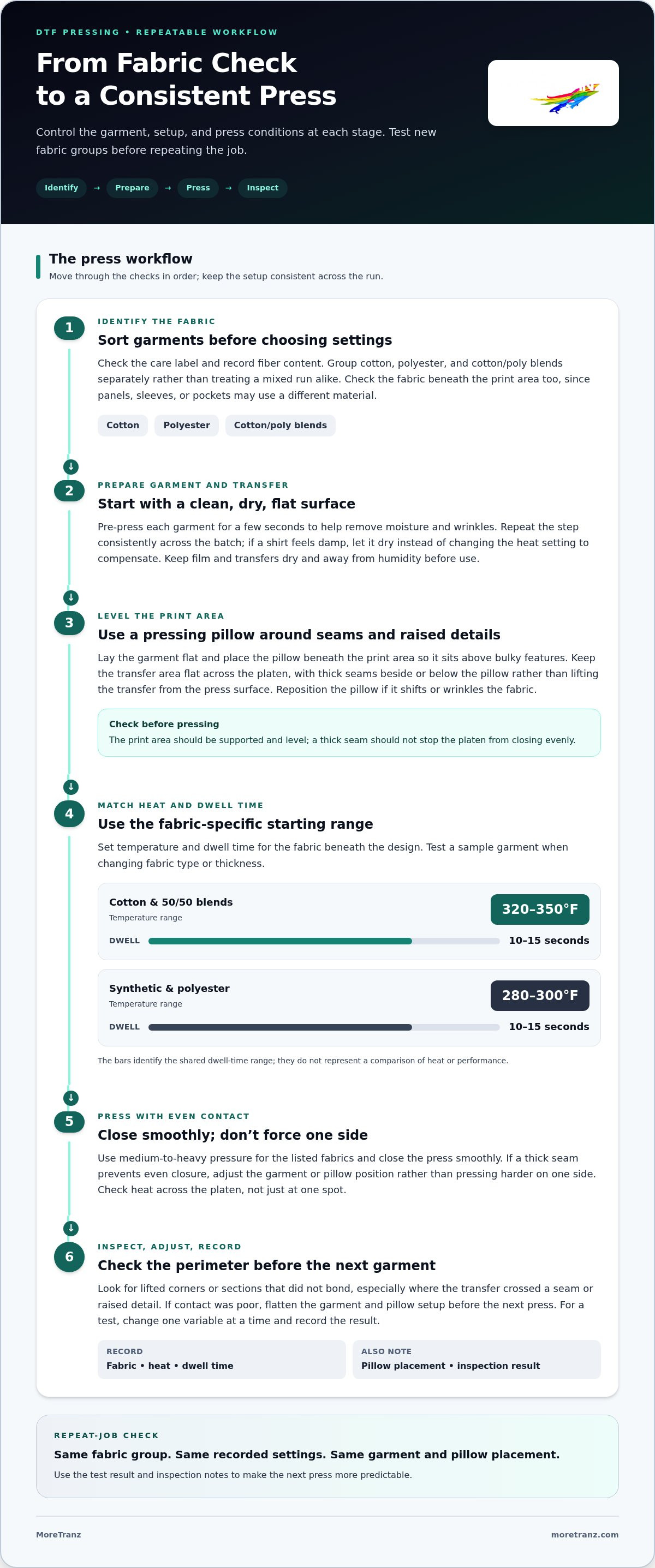
For pressing, cotton and 50/50 blends use 320-350°F for 10-15 seconds; synthetic and polyester fabrics use 280-300°F for 10-15 seconds. Keep transfers in a dry, controlled environment, away from humidity before use.
- Position the seam away from the platen’s pressure zone. Lay the garment flat and stable, then slide a pressing pillow beneath the print area. The raised seam sits beside or below the pillow, rather than lifting the transfer from the press surface. For example, support a chest design while a thick side seam rests beyond the pillow’s edge.
- Match the pillow to the garment’s construction. Choose a pillow that lifts the print area above bulky features, such as a collar, pocket, zipper, or hem. Check that the transfer area remains flat across the platen. If the pillow shifts or wrinkles the fabric, reposition it before pressing. Stable placement helps the transfer meet the garment evenly.
- Keep pressure even instead of forcing the press closed. A pillow helps level raised areas, but it doesn’t correct every pressure imbalance. Close the heat press smoothly and use medium-to-heavy pressure for the listed fabrics. If a thick seam prevents the platen from closing evenly, adjust the garment or pillow position. Don’t compensate by pressing harder on one side.
- Set temperature and dwell time for the fabric. Use the recommended 320-350°F range and 10-15 seconds for cotton or 50/50 blends. For synthetic or polyester apparel, use 280-300°F for 10-15 seconds. Test a sample garment when changing fabric type. A polyester panel next to a cotton seam can need a different heat approach than an all-cotton shirt.
- Inspect edges before moving to the next garment. After pressing, check the transfer perimeter, especially where it crossed a seam or raised detail. Look for lifted corners or sections that didn’t bond. If an edge has poor contact, flatten the garment and pillow setup before the next press. Keep fabric position, pressure, temperature, and dwell time consistent across the run.
- Separate pressing temperature from humidity control. Heat and dwell time are set for the fabric; humidity matters in transfer storage and handling. Keep film and transfers dry before use, and avoid leaving them exposed to humid air. Record the fabric, heat setting, dwell time, and pillow placement for each repeat job.
Per-transfer costs depend on design size, order volume, and whether you buy transfers ready-made or print them in-house. Printing in-house requires a printer, curing equipment, film, ink, and adhesive powder.
Fabric selection and adjustment of settings
To get consistent results with DTF, identify the garment fabric before choosing press settings. Cotton, polyester, and blended fabrics respond differently, so sort them before production and test unfamiliar materials on a sample.
-
Check the Garment Fabric Type
Read the care label and record the fiber content before pressing. Sort cotton, polyester, and cotton/poly blends into separate groups rather than treating a mixed production run alike. For example, label a 50/50 shirt separately from a polyester jersey. Check the fabric beneath the design too, since sleeves, pockets, or panels may use a different material.
-
Choose Suitable Garment Fabrics
Start with cotton, polyester, or cotton/poly blends, which are fabrics on which DTF transfers perform well. Natural fibers such as 100% cotton and high-cotton blends tend to bond well. Polyester can also work, but lower heat or adjusted pressing time can help limit fabric damage and support adhesion. Test unfamiliar textures or garments before committing a full production batch.
-
Adjust Settings for Fabric Thickness
Set temperature and dwell time by fabric type, then consider garment thickness. Cotton and 50/50 blends use 320-350°F for 10-15 seconds. Synthetic and polyester fabrics use 280-300°F for 10-15 seconds. A thick fleece and lightweight jersey may respond differently within those ranges. Test a sample garment and inspect adhesion before repeating the setup.
- Group garments by fabric and weight. Sort each production run into matching groups, such as cotton tees, blended hoodies, and polyester jerseys. This prevents you from applying one setting automatically to different materials. For garments with mixed panels, use the fabric beneath the transfer as your starting point. Record each group’s settings to keep the setup traceable.
- Prepare garments consistently. Pre-press each garment for a few seconds to help remove moisture and wrinkles, then lay it flat. Repeat this step consistently across the batch. If a shirt feels damp, let it dry before applying the transfer instead of changing heat settings to compensate. This gives each press a more reliable starting surface.
- Test, assess, and record. Press one sample from each fabric group, then check for lifted edges, incomplete adhesion, or visible fabric damage. Change one variable at a time, such as temperature or dwell time, and record the result. To get consistent results with DTF, keep these test records with the garment type for future repeat orders.
- Trial new garment combinations before scaling. A different fabric finish or thickness can affect how a transfer bonds. Compare a sample against your approved result before moving into full production. If you’re testing new artwork or garments, the DTF transfer sample pack can help you assess the application.
DTF film printing and adhesive powder application
A consistent in-house setup uses a DTF printer, compatible DTF ink, transfer film, and adhesive powder. To reduce banding, color shifts, and weak adhesion, check the printer before each job, keep materials consistent, and apply powder evenly before curing.
-
Print the Design onto DTF Film
Run a nozzle check before each print job, then inspect the test pattern for missing lines that could cause banding. Use the same film and ink throughout a production run to limit material changes that can affect prints. Double-sided coated transfer film can support ink absorption and reduce color distortion. Check the printed image for gaps or streaks before applying powder.
-
Apply the Adhesive Powder
Cover the wet ink evenly with adhesive powder so the printed areas receive a consistent coating. Tilt or gently shake the film to distribute powder across the image, then shake off the excess. Powder should cling to the ink, not form loose piles on clear film. Even coverage supports adhesion and helps prevent rough, uneven sections after curing.
-
Check for Application Mistakes
Inspect the film for clumps, bare spots, or powder scattered beyond the printed design. Clumps can create a rough finish, while uncovered ink can lead to poor adhesion. If the powder is uneven, remove the excess and reapply before curing. A dense logo, for example, may need careful shaking so its small details don’t hold excess adhesive.
- Keep the material combination stable. Changing film or ink midway through a run adds variables that can affect absorption, release, and color. Use the same materials for repeat jobs when possible, and record any changes alongside the print results. If a new film behaves differently, assess its ink coverage and release before printing the full batch.
- Cure the powdered film consistently. A recommended curing range is 320°F to 350°F, or 160°C to 180°C, for 2 to 3 minutes. Spread the film flat so heat reaches the powdered design evenly. Watch for powder that remains visibly loose or uneven after curing. Keep the same curing setup across a batch rather than changing several conditions at once.
- Track defects back to the stage that caused them. Banding points to print output, while patchy powder coverage may signal inconsistent application. Color shifts can involve changes in ink or film. Poor adhesion may start with missed ink coverage or uneven powder. Record the defect and materials used, then adjust one part of the workflow before the next job.
Checking actual platen temperature
A heat press display shows the selected setting, not necessarily the temperature across the platen. Measure the pressing surface directly, then compare readings with the appropriate range for the fabric before a DTF production run.
- Set the press for the garment fabric. Use 320-350°F for cotton or 50/50 blends, and 280-300°F for polyester or synthetic fabrics. Treat these as starting ranges, not proof that the platen surface has reached the selected temperature. A display set to 320°F can’t show whether the center and edges heat evenly.
- Measure the platen surface directly. Use a contact surface thermometer or temperature strips designed for heat-press surfaces. Follow the measuring tool’s instructions and let the heat press reach its set temperature first. Don’t rely on the controller display alone. For example, a display reading of 320°F doesn’t confirm that the transfer area reaches 320°F.
- Check several locations across the platen. Take readings at the center, near each edge, and at the corners. A single center reading can miss a cooler area where a design sits. Record the locations and results alongside the press setting. If the left edge reads differently from the center, place a sample design over each area and compare adhesion.
- Repeat the check after changing the setup. Recheck the platen when you change its setting, install a lower platen, or switch presses. Keep the garment and transfer position consistent during each comparison. If the readings change after an adjustment, record the new values before pressing production apparel. This reveals the difference between the display setting and the measured surface temperature.
- Use a sample to connect temperature with results. Press one test garment using a fabric-appropriate temperature and dwell time. Inspect the transfer edges and surface after pressing. If adhesion varies between the center and edge, compare those areas with your recorded temperature readings. Change one variable at a time, such as press temperature or garment position, to keep the cause clear.
- Keep temperature separate from pressure and time. A smooth transfer depends on all three, but changing them together hides the source of a defect. Keep dwell time consistent while checking platen heat. For cotton, the recommended time is 10-15 seconds; use that range with its recommended temperature. Record pressure separately, then make a controlled test if results vary.
- Maintain a simple press log. Record fabric type, heat-press setting, surface readings, dwell time, and design position for each test. For example, label one result “polyester, 280-300°F range, edge reading.” Compare the log when a later garment shows lifting or uneven adhesion. If proper readings remain inconsistent, remove the press from production until its heat distribution is assessed.
Design resolution, color management, and placement
Sharp artwork, repeatable color settings, and measured placement support clean DTF application. Prepare each design before printing, then use the same placement method throughout the production run.
- Prepare artwork at sufficient resolution. Set raster designs to at least 300 DPI at their intended print size. Enlarging a small image can expose pixelation, jagged edges, and blurred details. Check fine text and thin lines at full size before sending artwork to print. If the design looks soft on screen, increasing press pressure won’t restore its detail.
- Choose the right file format for the artwork. Use vector graphics for designs that need scaling, since vectors can enlarge without losing quality. Save raster artwork as PNG or TIFF to preserve image data and transparency; tools like removephotobg.com can help generate clean PNG cutouts ready for print. A small logo supplied as a raster file, for example, may lose clarity when enlarged for a large chest print. Keep the original file for future size adjustments.
- Match color management to the materials. Use an ICC profile suited to your specific printer materials to optimize color output. Keep the profile and material combination consistent across repeat jobs. A profile prepared for one film may produce a different appearance with another. Compare a printed test design with the intended artwork before approving a full production batch.
- Measure the garment before placing the transfer. Find the shirt’s center line with a 24-inch ruler, then align the design to that reference. For most standard designs, position the transfer’s top approximately 3 inches below the collar’s bottom edge. A four-fingers’ width below the collar can serve as a rough guide, but measuring gives repeat jobs a clearer reference.
- Use one placement reference for each garment style. Record the design’s center line and distance from the collar for the shirt style in production. Compare the first garment with that reference before pressing the rest. For a standard tee, for example, align each design from the center line instead of estimating by eye. This helps prevent gradual shifts across a stack of apparel.
- Review the transfer layout before application. Check the final print size, orientation, and position on the film before pressing. Confirm that the artwork isn’t accidentally mirrored or cropped. Place the transfer against the garment and compare its edges with the collar and side seams. A quick visual check can catch placement errors before pressing.
- Keep a repeatable design record. Save the artwork version, output size, ICC profile, garment style, and placement measurements together. When a custom design returns for another order, these details provide a practical starting point. Compare the new test print with the saved reference, then adjust only what changed, such as garment size or artwork dimensions.
Transfers by MoreTranz: TrueColor® MAX DTF Transfers
Transfers by MoreTranz offers TrueColor® MAX DTF Transfers for apparel decorators who want to focus on garment selection, placement, and pressing rather than printing film and applying powder in-house. Choose ready-to-press transfers to fit your existing heat-press workflow.
TrueColor® MAX is the premium 9-color DTF option; TrueColor® DTF Transfers provide the 5-color standard option. Transfers by MoreTranz also offers Spangle Transfers and UV DTF Transfers for other project needs. Match the transfer type to the intended application, then use the fabric and press checks in this guide to build a repeatable process when learning how to get consistent results with DTF.
Visit moretranz.com to explore transfer options for your next production run.
Build a Repeatable Workflow for Your Next Run
Turn your next production run into a documented baseline. Save the approved artwork, garment type, transfer placement, and press workflow together. When results change, review the job record before adjusting settings. This makes troubleshooting more deliberate and helps keep successful setups repeatable across future orders.
Getting consistent results with DTF is an ongoing process, not a single press adjustment. Use each sample run to confirm your workflow on the garments you plan to decorate, then carry the proven setup forward. When preparing a new design or fabric combination, a sample can help you evaluate the application before scaling production.
Refine your process one controlled change at a time. With a clear baseline and careful production notes, you can approach your next run with greater confidence.
Frequently Asked Questions
Do DTF transfers crack or peel?
Yes, cracking or peeling can happen when the transfer doesn’t bond well or garment care stresses the print. To evaluate a new application, let the garment rest for at least 24 hours before washing. Then wash it inside out in cold water with gentle detergent, and avoid bleach and fabric softener. Compare the print’s edges and surface after washing. This can help distinguish application problems from damage caused during laundering.
How do you calibrate a DTF printer for consistent color and registration?
Start with a nozzle check before each print job, and correct missing lines before printing artwork. Use an ICC profile suited to your printing materials, then print a test design to compare color and alignment. If registration shifts, check artwork placement and film feed before changing color settings. Record the printer setup and test results so you can identify which adjustment improved the next print.
How do you apply and cure DTF adhesive powder evenly?
Apply powder across the printed areas, then remove excess before curing. Inspect the film under good lighting: bare ink patches can weaken adhesion, while clumps may create rough spots. Cure the film at 320°F to 350°F for 2 to 3 minutes. Check that the powder has fused evenly across the design before pressing. If a test shows uncovered sections, correct powder distribution before running another batch.
What heat press temperature, pressure, and time work best for DTF transfers?
The right setting depends on the transfer instructions and garment fabric. As a starting point, use medium-to-firm pressure and a 10-15-second dwell time, then test the result on a sample garment. A separate temperature check across the platen can reveal uneven heat that the press display won’t show. Record the garment, press setting, and outcome together, so you can repeat successful applications without changing several variables at once.
How do DTF settings differ for cotton, polyester, and blended fabrics?
Cotton and 50/50 blends commonly use 320-350°F for 10-15 seconds; polyester and synthetic fabrics commonly use 280-300°F for 10-15 seconds. Polyester may need lower heat to help limit fabric damage while supporting adhesion. Sort garments by fiber content before a run, and test unfamiliar fabric weights separately. A sample helps reveal whether the fabric’s thickness or surface needs a setting adjustment.
How should DTF ink and film be stored and maintained?
Keep transfer film dry and protected from humidity before use, since moisture can affect handling and application. Store DTF inks in a cool, dry place away from direct sunlight. For printer upkeep, shake the white ink tank daily, clean the printhead and cap station daily, and perform deep cleaning weekly. A nozzle check before each job can also reveal print issues before they affect a full production run.
How do you test DTF wash durability and troubleshoot peeling or fading?
Wait at least 24 hours after pressing before washing a test garment. Wash it inside out in cold water with gentle detergent, then air-dry it or use low tumble heat. Avoid bleach, fabric softener, and direct ironing on the print. Inspect for lifted edges, cracks, or fading after washing. High-quality transfers may withstand approximately 50 to 100 washes under regular use and standard washing and drying practices.